
How to show one single page at a time at 100% zoom in Word ?
I am viewing a document at 100% zoom in Microsoft Word. There are 2 pages displayed next to each other on the screen. How can I display only one page at a time, when 100% zoom is applied ?


Hi,
To show only one page on screen at a time at 100% zoom, you have to click on View and choose One Page in Zoom section.
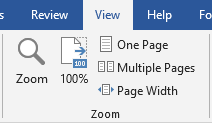
To show only one page on screen at a time at 100% zoom, you have to click on View and choose One Page in Zoom section.


1 answer

Related questions
How to change the font of equation formula in Word ?
How to enlarge pasted screenshot image in Word ?
Excel and Word menu tabs & tools in toolbars disabled / grayed out
Download and use free Microsoft Office Excel and Word on tablet
Word and Excel alternative apps for Android - free download
Free SEO tools list - On-Page, Off-Page and Backlinks checker
Create table of contents linked to headings and pages in Word
Trending questions
List of all english tenses with structure formula and examples 5000 mAh battery charging time with 15W, 25W, 45W charger Is correct to say that something is Reset, Reseted or Resetted ? CPU 4nm, 3nm, 2nm difference. Is processor with lower NM better? Man Month calculation - how many man days or man hours ? Is Samsung Ultra camera better than Fold, Flip, regular S phones ? Samsung Galaxy A & F better than M series ? What's the difference ?
List of all english tenses with structure formula and examples 5000 mAh battery charging time with 15W, 25W, 45W charger Is correct to say that something is Reset, Reseted or Resetted ? CPU 4nm, 3nm, 2nm difference. Is processor with lower NM better? Man Month calculation - how many man days or man hours ? Is Samsung Ultra camera better than Fold, Flip, regular S phones ? Samsung Galaxy A & F better than M series ? What's the difference ?
2026 AnswerTabsTermsContact us